

Publishing and versions
Last updated 14 August 2026
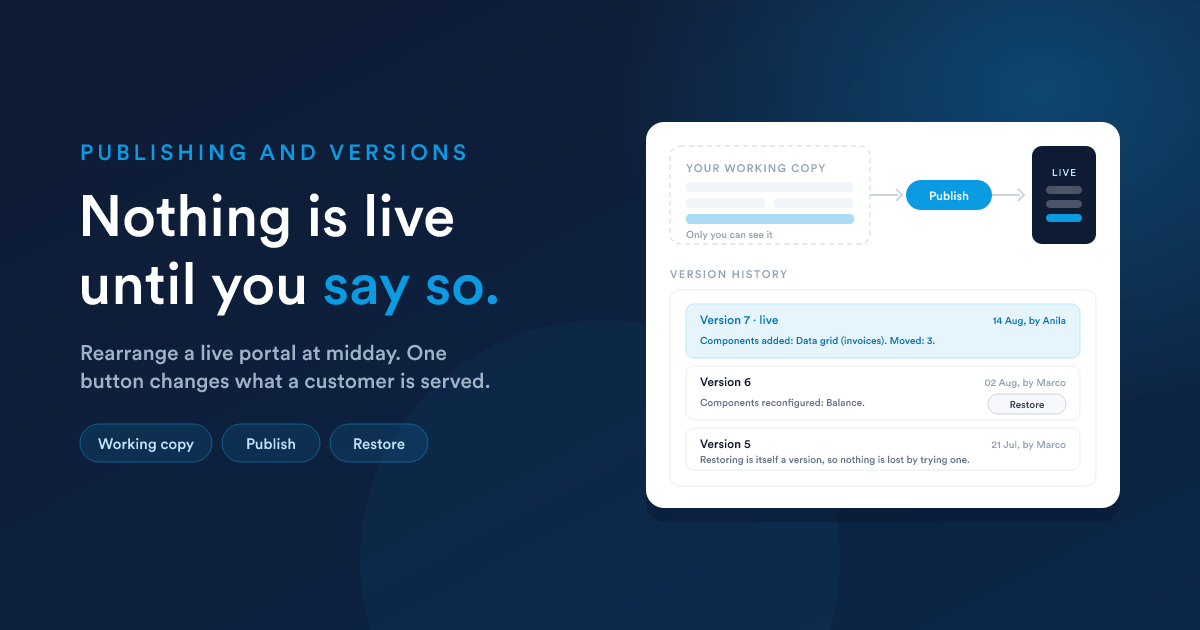
Everything you do in the builder, every drag, resize, rename and setting, goes into a working copy. Only you can see it. The live portal carries on serving what was last published.
| Action | What it does |
|---|---|
| An edit | saved immediately, to your working copy |
| Publish | makes that copy live, and records a version |
| Discard changes | throws the working copy away and returns to what is live |
| Preview | opens the public portal, which shows what is published |
The Publish button says which state you are in: highlighted while there is unpublished work, disabled when there is none. That is the only trace unpublished work leaves anywhere, so it is worth reading before you leave the screen.
Preview shows the published portal, not your working copy. That surprises people once. It is the right way round: preview answers "what are my customers looking at", which is the question worth being able to ask at any moment.
Two things about the working copy
- It lasts as long as your login. It is unpublished work, not a document store. Do not leave a week of layout changes sitting in it.
- Two people editing one portal each have their own, and whoever publishes last wins outright. There is no merge and no lock, so agree who is editing.
Publishing
Press Publish. What happens:
- Your working copy becomes the live layout.
- A version is recorded, with what changed and who published it.
- Your working copy is cleared, because it is now what is live.
Publishing needs the publish permission, which is separate from being able to edit. Somebody can be allowed to build and not to ship.
Publishing is refused while a component is unfinished
If any component is missing a setting it cannot draw without, publishing stops and names them. A half-configured component would render as a hole in a customer's page, which is worse than the change waiting a minute.
The common ones:
| Component | Refuses without |
|---|---|
| Data grid, chart, calendar, map, metric | its report, and the columns that report has to supply |
| Chart | the axes, or the slice label and value for a pie |
| Metric | the column holding the number |
| Form | the form |
| Button | its label, and its destination |
| Modal | either markup or a form: exactly one of the two |
A modal is the one that hides. It is not on the page, so an unfinished dialog cannot be spotted by looking at the canvas. The modal tray marks it, and the refusal names it.
Being published is not the same as being open
Two separate switches, and both are needed:
| Switch | What it decides |
|---|---|
| Publish (in the builder) | there is a layout to serve |
| Active (on the portal) | the address answers at all |
A new portal is not active, deliberately: a freshly built portal should not start answering the moment somebody guesses the address. Turn it on when you are ready for customers.
Versions and restoring
Every publish records a version. The builder's sidebar shows which version is live, with a Version history link beside it: the version number, when it was published, by whom, and what changed. A portal that has never been published says so instead.
The change note is generated for you by comparing the new layout with the previous one:
Components added: Data grid (invoices). Components reconfigured: Balance. Components moved: 3.
There is no box to type a note in, deliberately: a note somebody has to write is a note somebody leaves blank, and a list of blank notes cannot be read.
Moves are counted rather than named, because dragging a page into shape touches a dozen components and is one piece of news, not twelve.
Restore
Restore on any version puts that layout back, live, and records a new version saying it did. So restoring is itself undoable, and nothing is lost by trying one.
Restoring also clears your working copy, which would otherwise sit straight back over the version you just restored.
Who did what
Portal activity appears in the audit log: created, updated, deleted, published (with the version number) and restored.
Editing is not audited, because the builder saves into your working copy and a twenty-minute layout session is thousands of edits. What changed between two published states is what the version history is for.
Troubleshooting
The portal address does nothing, or says it is unavailable
| Check | Note |
|---|---|
| Is the portal Active? | a new one is not |
| Has it ever been published? | a layout has to exist to be served |
| Is the alias right? | the builder sidebar shows the real address as a link |
A customer says the code never arrives
| Check | Note |
|---|---|
| Does their address match the Email Field on their record, exactly? | a second address on the record is not the one the portal reads |
| Do they pass the portal's Which Customers filter? | a filter change can silently drop somebody |
| Is their Access Field on? | this is the switch that grants access |
| Have they just asked for one? | another code cannot be sent immediately |
| Has the code expired? | codes are short-lived. Ask for a new one |
If a code does not work, ask for a new one from the sign-in screen.
A customer signs in and sees somebody else's rows
Stop and check the report behind that component. The portal adds nothing to your SQL, so the report has to narrow itself with {{ entity.id }}. See Data and reports. This is the one failure with no symptom on your screen, because staff see everything either way.
A component shows nothing
| Cause | What it looks like |
|---|---|
| The report returns nothing for this customer | often correct, and the component says so |
| The report is pointed at the wrong kind | grids, charts, calendars, maps and metrics need a Data Grid report |
| A column was renamed in the report | the setting that pointed at it no longer resolves |
| The report itself is failing | open it in Reports and run it |
A component draws differently from the canvas
The canvas is as wide as your screen, and the portal is capped for readability. A component whose content reflows will therefore wrap differently. Leave room, the same way you would for a longer translation.
Also: previews in the builder run reports with no customer in context, so a correctly written report previews empty. Use Preview and a test customer to see the real thing.
An HTML component has a gap above it, or drifts
Two silent parse effects, both covered in HTML components: text sitting outside any element gets wrapped in a paragraph, and a tag written inside a comment becomes real. Both are invisible until you look at what was stored.
Publish is greyed out
There is nothing to publish: your working copy is empty because everything has already gone live. If you expected changes, check you are on the portal you think you are.
Somebody's changes vanished
Working copies are per person and last as long as a login. If two of you edited the same portal, the last publish won. Agree who holds a portal before a big rearrangement.
A short operating checklist
Before publishing anything customers will see:
- Every report on the page narrows itself to
{{ entity.id }}. - No report on the page carries staff links or internal columns.
- Every component has a name a customer would recognise.
- The page reads sensibly top to bottom, because that is what a phone shows.
- Signed in as a test customer, every table holds their rows and nobody else's.
- The portal is Active when, and only when, you want it answering.