

Finding records
Last updated 17 August 2026
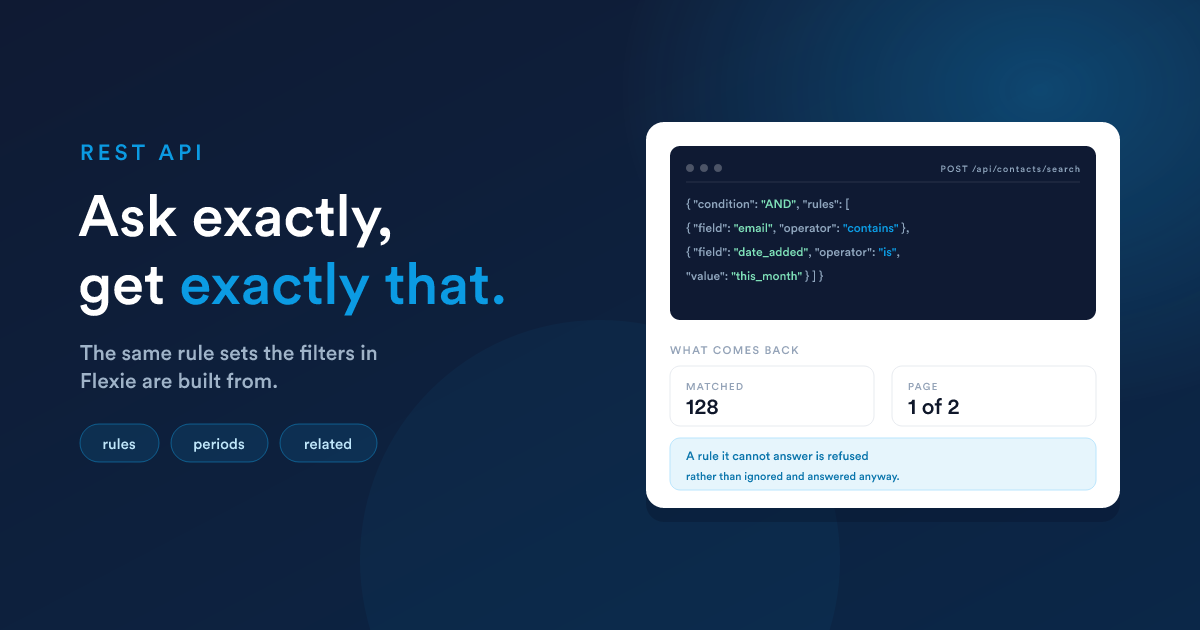
There are two ways to read a collection.
| You want | Send |
|---|---|
| everything, a page at a time | GET /api/contacts |
| only the records matching a condition | POST /api/contacts/search with a rule set |
Filtering has its own endpoint, /search, and it takes the same rule sets the filters in the Flexie interface are built from. Anything you can ask for on screen, you can ask for here.
It applies to the entities that hold records: contacts, leads, accounts, deals, cases and your own custom entities. Tasks, emails and reports list and read the same way but take no filters, and users are a read-only listing.
Listing
curl -X GET "https://your-subdomain.flexie.io/api/contacts?limit=30&start=0" \
-H "apikey: YOUR_API_KEY"| Parameter | Does | Default |
|---|---|---|
limit |
how many records to return | the account's page size |
start |
how many to skip | 0 |
orderBy |
the field to sort on | date_modified |
orderByDir |
ASC or DESC |
DESC |
limit is capped at 100. Ask for 500 and you get 100, with the true total in the response so you know to keep going.
The shape of a filter
curl -X POST "https://your-subdomain.flexie.io/api/contacts/search" \
  -H "apikey: YOUR_API_KEY" \
  -H "Content-Type: application/json" \
  -d '{
    "filters": {
      "condition": "AND",
      "rules": [
        { "field": "email", "operator": "contains", "value": "acme.com" }
      ]
    },
    "orderBy": "date_added",
    "orderByDir": "DESC",
    "page": 1,
    "limit": 50
  }'
A rule has three parts:
| Key | Holds |
|---|---|
field |
the field's alias, or an object for a field on a related record |
operator |
what to compare, from the tables below |
value |
what to compare against. Some operators take none |
And the response tells you where you are:
{ "total": "4", "current_page": 1, "total_pages": 1, "contacts": [ … ] }Which fields, and which operators
You do not have to guess either. Ask the entity what it can be filtered by, and it answers with everything: its own fields, the ones Flexie maintains such as date_added, the ids of records it points at, and the fields of every record it is related to.
curl "https://your-subdomain.flexie.io/api/contacts/list/filters" \
  -H "apikey: YOUR_API_KEY"
Each entry gives exactly what to send as field, the operators it accepts, and the shape of value each one wants, and each says which group it belongs to so you can present them the way the interface does.
Use this one for filtering. There is a second endpoint, list/fields, which returns the fields somebody configured on the entity and nothing else:
curl "https://your-subdomain.flexie.io/api/contacts/list/fields" -H "apikey: YOUR_API_KEY"Both answer in the same shape, so one reader handles either. The difference is scope: list/fields is your own fields, list/filters is everything a rule may name, which also takes in the fields Flexie maintains, the ids of related records, and the fields on the other side of a relationship. A field that is configured but cannot be filtered comes back with an empty operators list, and a rule naming it is refused.
{
  "total": 168,
  "fields": [
    {
      "field": "date_added",
      "label": "Date Added",
      "type": "datetime",
      "group": "System Fields",
      "related": false,
      "operators": [
        { "operator": "is",       "value": "period" },
        { "operator": "between",  "value": "range"  },
        { "operator": "greater",  "value": "single" },
        { "operator": "is_empty", "value": "none"   }
      ]
    }
  ]
}
field is the name to put in a rule. Beside each operator is the shape of value it expects, and that word is a description rather than a value: { "operator": "is", "value": "period" } means is wants a period, not that you should send the word period.
| Shape | What to send |
|---|---|
single |
One value.{ "field": "email", "operator": "contains", "value": "acme" } |
range |
Two bounds in an array, the low one first.{ "field": "amount", "operator": "between", "value": [1000, 5000] } |
period |
A named stretch of time, so you never work out a date yourself.{ "field": "date_added", "operator": "is", "value": "this_year" } |
offset |
A sign, a number and a unit, as three strings.{ "field": "date_added", "operator": "less_than_now", "value": ["-", "7", "days"] } |
list |
An array of values, any of which match.{ "field": "owner_id", "operator": "in", "value": [1, 6] } |
polygon |
The points of an area. Only on a map field, where the area is drawn rather than typed. |
none |
Nothing at all, leave value out.{ "field": "phone", "operator": "is_empty" } |
Every period and every offset is listed further down, under Periods and Relative to right now.
Read the field list once at the start of an integration and you know how to ask about anything on the entity, including fields somebody added after you wrote the code.
The fields Flexie maintains
Alongside your own fields, every record carries a set Flexie keeps up to date, and they answer most of the questions worth asking. They appear in the filter list under System Fields, and they are not in list/fields because nobody configured them:
| Field | Holds |
|---|---|
date_added, date_modified |
when the record appeared and when it last changed |
email_count, last_email_date |
emails sent, and the last one |
marketing_email_count, last_marketing_email_date |
the same for marketing email |
last_email_click_date |
the last time they clicked something |
sms_count, last_sms_date |
messages sent, and the last one |
task_count, last_task_date |
tasks logged, and the last one |
_next_upcoming_task_date |
the next task due, if any |
note_count, last_note_date |
notes written, and the last one |
last_hit_date |
the last visit to your site |
Contacts add deal_count, last_deal_date, deal_ltv and converted_date.
The counts are numbers and the dates are datetimes, so they take the operators of those types. "Never emailed" is last_email_date with is_empty, and "quiet for three months" is the same field with is_not and last_90_days.
Every operator
Which operators a rule may use depends on the field's type. This is the whole set:
| Field type | Operators |
|---|---|
| text, url | equal, not_equal, contains, not_contains, begins_with, not_begins_with, ends_with, not_ends_with, is_empty, is_not_empty |
| tags, multiselect | contains, not_contains, begins_with, not_begins_with, ends_with, not_ends_with, is_empty, is_not_empty |
| number | equal, not_equal, greater, greater_or_equal, less, less_or_equal, between, not_between, is_empty, is_not_empty |
| boolean, select, country, region, timezone, state | equal, not_equal, is_empty, is_not_empty |
| multi-value select | in, not_in |
| datetime | is, is_not, equal, not_equal, greater, greater_or_equal, greater_than_now, less, less_or_equal, less_than_now, between, not_between, is_empty, is_not_empty |
| date | the same, with greater_than_today and less_than_today in place of the _now pair |
| time | equal, not_equal, greater, greater_or_equal, less, less_or_equal, between, not_between, is_empty, is_not_empty |
| reference | equal, not_equal, is_empty, is_not_empty |
| point | in_polygon, is_empty, is_not_empty |
| date range | includes, excludes, is_empty, is_not_empty |
| list membership | in_list, not_in_list |
| subscription | is_subscribed, is_not_subscribed, on the __unsubscribes field |
An operator the field does not accept is refused with a 400, not ignored.
Text
Everyone at a domain:
{ "field": "email", "operator": "contains", "value": "acme.com" }Only addresses that end in it, which is the stricter question:
{ "field": "email", "operator": "ends_with", "value": "@acme.com" }A reference that starts with a prefix:
{ "field": "customer_code", "operator": "begins_with", "value": "AC-2026" }An exact match, and its opposite:
{ "field": "status", "operator": "equal", "value": "Qualified" }
{ "field": "status", "operator": "not_equal", "value": "Qualified" }
Records missing something, and records that have it:
{ "field": "phone", "operator": "is_empty" }
{ "field": "phone", "operator": "is_not_empty" }
is_empty and is_not_empty take no value at all. Note that not_equal and not_contains match only records that have a value, so pair them with is_empty in an OR group when you want the blanks too.
Numbers
{ "field": "deal_count", "operator": "greater", "value": 0 }
{ "field": "annual_revenue", "operator": "greater_or_equal", "value": 50000 }
{ "field": "points", "operator": "between", "value": [100, 500] }
{ "field": "points", "operator": "not_between", "value": [100, 500] }
between and not_between take their two bounds as an array, low first.
Dates
A fixed range, both bounds together:
{ "field": "date_added", "operator": "between",
  "value": ["2026-01-01 00:00:00", "2026-06-30 23:59:59"] }
Everything since a moment, or everything before one:
{ "field": "date_added", "operator": "greater", "value": "2026-01-01 00:00:00" }
{ "field": "date_added", "operator": "less", "value": "2026-01-01 00:00:00" }
Periods, so you never calculate a boundary
is and is_not take a period instead of a date, and it is worked out at the moment the request runs. A saved query stays correct as time passes:
{ "field": "date_added", "operator": "is", "value": "this_month" }
{ "field": "date_added", "operator": "is_not", "value": "this_year" }
The periods are:
| Group | Values |
|---|---|
| days | today, yesterday |
| calendar | this_week, this_month, this_quarter, this_year |
| the one before | last_week, last_month, last_quarter, last_year |
| the one ahead | next_week, next_month, next_quarter, next_year, next_day |
| rolling back | last_hour, last_12_hours, last_24_hours, last_7_days, last_14_days, last_30_days, last_60_days, last_90_days |
| rolling forward | next_hour, next_12_hours, next_24_hours, next_7_days, next_14_days, next_30_days, next_60_days, next_90_days |
| special | birthday_today |
Relative to right now
greater_than_now and less_than_now take an offset, written as three parts: a sign, a number and a unit.
Anything due in the next three days:
{ "field": "due_date", "operator": "less_than_now", "value": ["+", "3", "days"] }Anything untouched for a fortnight:
{ "field": "date_modified", "operator": "less_than_now", "value": ["-", "14", "days"] }On a date field the two are called greater_than_today and less_than_today, and they compare whole days.
Yes and no
A boolean is matched with the words, not with true and false:
{ "field": "is_reseller", "operator": "equal", "value": "yes" }
{ "field": "is_reseller", "operator": "equal", "value": "no" }
A record where the box was never touched is neither, so it answers to is_empty.
References
Every record carries the ids of the records it points at, and they come back in the response alongside everything else:
{ "id": "8873", "account_id": "354", "owner_id": "9", "subscriptions_id": null }So when you already hold an id, filter straight on it. Everything belonging to one account:
{ "field": "account_id", "operator": "equal", "value": 354 }Everything not yet attached to anything, which is the usual way to find orphans to clean up:
{ "field": "account_id", "operator": "is_empty" }A reference rule has to sit in an AND group. Inside an OR it is refused rather than quietly matching something else.
Reaching into a related record
You can filter on a field of the record at the other end of a relationship, which is how you ask for "contacts whose account is called something" without fetching accounts first:
{ "field": { "entity": "account", "field": "name" }, "operator": "contains", "value": "acme" }The join is worked out for you.
Which relationships exist depends on how your workspace is set up, so the entity publishes them:
curl "https://your-subdomain.flexie.io/api/contacts/list/filters" \
  -H "apikey: YOUR_API_KEY"
Entries with "related": true sit at the other end of a relationship, including your own custom entities. Their field is an object rather than a name:
{
  "label": "Subscription / Status",
  "related": true,
  "field": {
    "entity": "subscriptions",
    "relation": "manyToOne",
    "through": "subscriptions_id",
    "field": "status"
  }
}
Put that object into a rule as it is:
{
  "field": { "entity": "subscriptions", "field": "status" },
  "operator": "equal",
  "value": "past_due"
}
entity and field identify it. Where an entity can be reached by more than one route, add through to say which. The join is worked out for you, and the rule looks the same whether the relationship is one-to-many or many-to-many. Examples has this in both directions, including between two custom entities.
Email subscription
Whether someone may be emailed is not a field on the record. It is whether an unsubscribe exists for their address, so it is asked with its own field, __unsubscribes, and it takes no value:
{ "field": "__unsubscribes", "operator": "is_subscribed" }
{ "field": "__unsubscribes", "operator": "is_not_subscribed" }
Every record is one or the other, so the two add up to the whole set. It matches on the address, which means a contact and a lead sharing an address are both opted out, and a record with no address is counted as subscribed because there is nothing to have unsubscribed.
Combine it like any other rule. People who have opted out of email but left you a phone number:
{
  "condition": "AND",
  "rules": [
    { "field": "__unsubscribes", "operator": "is_not_subscribed" },
    { "field": "phone", "operator": "is_not_empty" }
  ]
}
Combining conditions
Any rule can be a group instead: give it its own condition and rules, and groups nest as deep as you need.
Contacts added this year that are either at your domain or have no address at all:
{
  "condition": "AND",
  "rules": [
    { "field": "date_added", "operator": "is", "value": "this_year" },
    {
      "condition": "OR",
      "rules": [
        { "field": "email", "operator": "contains", "value": "acme.com" },
        { "field": "email", "operator": "is_empty" }
      ]
    }
  ]
}
A worked example putting most of it together. Contacts at one account, with at least one deal, touched in the last month, newest first:
curl -X POST "https://your-subdomain.flexie.io/api/contacts/search" \
  -H "apikey: YOUR_API_KEY" \
  -H "Content-Type: application/json" \
  -d '{
    "filters": {
      "condition": "AND",
      "rules": [
        { "field": "account_id", "operator": "equal", "value": 354 },
        { "field": "deal_count", "operator": "greater", "value": 0 },
        { "field": "date_modified", "operator": "is", "value": "last_30_days" }
      ]
    },
    "orderBy": "date_modified",
    "orderByDir": "DESC",
    "page": 1,
    "limit": 100
  }'
Paging
page and limit walk a filtered result, and total counts the whole set rather than the page:
{ "filters": { … }, "page": 1, "limit": 100 }
{ "filters": { … }, "page": 2, "limit": 100 }
total_pages in the response tells you when to stop. Send an orderBy whenever you page, because without one nothing guarantees the same order between requests, so a record can appear twice or be skipped.
Custom records
A custom entity filters exactly the same way. The path carries its table name exactly as it is set in Flexie, lower case with underscores:
curl -X POST "https://your-subdomain.flexie.io/api/ce/projects/search" \
  -H "apikey: YOUR_API_KEY" \
  -H "Content-Type: application/json" \
  -d '{
    "filters": {
      "condition": "AND",
      "rules": [
        { "field": "project_code", "operator": "begins_with", "value": "AC-2026" },
        { "field": "closed_date", "operator": "is_empty" }
      ]
    },
    "limit": 30
  }'
When a filter is rejected
A rule the entity cannot answer is refused with 400 and Invalid filters:
{ "error": { "code": 400, "message": "Invalid filters" } }This is deliberate. The alternative is to ignore the rule and reply with an unfiltered list and a 200, which looks exactly like a filter that matched everything. The causes:
- a field that is not one of the entity's filterable fields.
idis one of these, so filter on a field that identifies the record instead - an operator that field's type does not accept
- a reference rule inside an
ORgroup - a malformed rule set, such as a group with no
rules
A 400 means the filter never ran. It is not a partial result.
The older filter format
POST /api/contacts, the collection URL itself, accepts an older filters array. It still works and existing integrations need no change:
{
  "filters": [
    {
      "type": "text",
      "alias": "email",
      "value": { "operator": "like", "input": "acme.com" },
      "strict": false, "starts": false, "ends": false
    }
  ],
  "start": 0,
  "limit": 30
}
Its operators are eq, neq, gt, gte, lt, lte, like, notLike, in, notIn, isNull and isNotNull, and text matching is controlled by three booleans rather than by the operator name. like on its own is an exact match. strict: false with starts and ends both false matches anywhere in the field, starts: true matches the beginning and ends: true matches the end. Leave starts and ends out and they behave as true, which quietly turns "anywhere" into "begins with".
It has no groups, no periods and no way to reach a related record, so use /search for anything new.