

Authentication
Last updated 18 August 2026
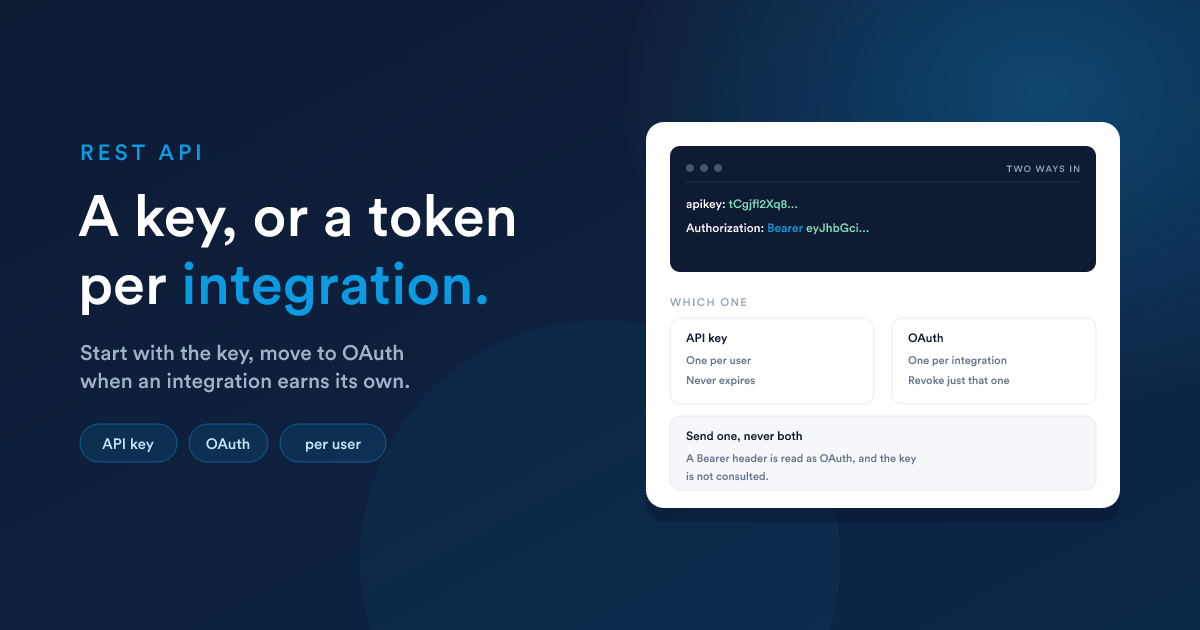
Every API request acts as a user. Whatever that person can see and change, the request can see and change, and nothing more. Their name is what appears in the history of anything the request touches.
There are two ways to prove who you are.
The two credentials
| API key | OAuth | |
|---|---|---|
| Looks like | apikey: tCgjfl… |
Authorization: Bearer … |
| One per | user | user / integration |
| Expires | never | depends on the type |
| Revoke one integration | not possible, one key serves them all | yes, independently |
| Stored by Flexie as | the key itself | a fingerprint of the token |
| Best for | a quick script, a first integration | anything you intend to keep |
Both are accepted on every endpoint. You do not have to choose up front, a workspace can start with the key and move to OAuth later, per user, without a flag day.
Using the API key
Send it in the apikey header:
curl "https://your-subdomain.flexie.io/api/leads?limit=5" \
  -H "apikey: YOUR_API_KEY"
Or as a query parameter, which is handy for a quick test in a browser:
curl "https://your-subdomain.flexie.io/api/leads?limit=5&apikey=YOUR_API_KEY"The header name is apikey, lower case, one word. X-Api-Key, Api-Key and ApiKey are not recognised.
Where to find it: open the user in Settings → Users, then the API Settings tab. The key is shown there and can be regenerated. Regenerating takes effect once you click Update: and it breaks every integration using the old key at that moment, because a user has exactly one key.
Do not send an
Authorizationheader with an API key. A request carryingAuthorization: Bearer …is treated as an OAuth request, and your key is not consulted. Send one credential or the other, never both.
Using OAuth
OAuth issues a separate credential per integration, so you can switch one off without touching the others, and you can see which integration did what.
For a server-side integration
This is what most integrations want: no browser, no login screen, one long-lived token.
- Open the user the integration should act as, in Settings → Users
- Go to the API Settings tab
- Click Add API client, name it after the integration, and save
- Copy the token, it is shown once
Then send it as a bearer token:
curl "https://your-subdomain.flexie.io/api/leads?limit=5" \
  -H "Authorization: Bearer YOUR_TOKEN"
Everything else about the request is identical. Same paths, same bodies, same responses.
For an app used by many people
An app that acts on behalf of whoever signs in uses the standard authorization-code flow against your workspace's OAuth server. It must request the api scope by name:
GET https://your-subdomain.flexie.io/oauth2/authorize
      ?response_type=code
      &client_id=YOUR_CLIENT_ID
      &redirect_uri=https://yourapp.example.com/callback
      &scope=api
      &state=RANDOM
      &code_challenge=…&code_challenge_method=S256
PKCE with S256 is required. Exchange the code at POST /oauth2/token as usual.
Name the scope. A request that names none is refused, and the api scope is never granted by omission:
{ "error": "invalid_scope", "error_description": "A scope is required." }Client credentials are issued by an administrator, in Settings → OAuth Clients. There is no self-registration endpoint: nothing writes a client row for a caller Flexie has not identified. An app distributed to many workspaces can instead publish a Client ID Metadata Document and use its URL as the client_id, in which case the row is created the first time somebody approves it on the consent screen.
Discovery
The REST API publishes its own RFC 9728 metadata:
curl "https://your-subdomain.flexie.io/.well-known/oauth-protected-resource/api"{ "resource": "https://your-subdomain.flexie.io/api",
"authorization_servers": ["https://your-subdomain.flexie.io"],
"scopes_supported": ["api"],
"bearer_methods_supported": ["header"] }The document at the bare /.well-known/oauth-protected-resource path describes the MCP server instead. Follow the one the WWW-Authenticate header points you at.
Moving a user from the key to OAuth
The two credentials are deliberately exclusive per user, so there is never a moment where both work and you cannot tell which an integration is using.
As soon as a user has one active API client, their API key stops working. Their next key-authenticated request gets:
{ "error": "api_key_disabled",
  "error_description": "This API key is disabled because an active OAuth client with the api scope exists for this user. Authenticate with OAuth instead, or deactivate that client to re-enable the key." }
Going back is one click. Switch the client off, or delete it, on that user's API Settings tab, and the key works again on the very next request. Nothing is lost, and no other user is affected: the switch is per person, and it is triggered by that person's own clients.
A sensible migration therefore looks like: create the client, move your integration over, confirm it works. If anything goes wrong, switch the client off and your old key is live again while you investigate.
Permission to use the API at all
Separately from which credential you hold, a user's role decides whether they may use the REST API. In Settings → Roles, under API Permissions, tick Access REST API.
A user whose role does not grant it is refused whichever credential they present:
{ "error": "access_denied",
  "error_description": "This account does not have REST API access. Ask an administrator to enable Access REST API for its role." }
That refusal is a 403, not a 401, because presenting a different credential will not help. Administrators always pass.
Every refusal, and what to do
| Status | error |
What happened | What to do |
|---|---|---|---|
| 401 | invalid_grant |
The API key is missing or unknown | Check the apikey header spelling and the key itself |
| 401 | api_key_disabled |
The key is valid, but this user has an active API client | Use OAuth, or switch that client off |
| 401 | invalid_token |
The bearer token is unknown, expired, revoked, from an inactive client, or issued for a different resource | Get a fresh token; if it was issued for MCP it will never work here |
| 403 | access_denied |
The user's role does not grant Access REST API | Enable it on the role |
| 404 | none | The request never reached the API | See below |
The OAuth refusals carry a WWW-Authenticate header pointing at the discovery document, so a standards-aware client can restart the flow on its own:
WWW-Authenticate: Bearer resource_metadata="https://your-subdomain.flexie.io/.well-known/oauth-protected-resource/api", scope="api", error="invalid_token"It names the scope as well as the document, so a client is told what to ask for rather than left to work it out.
A 404 on a path you know exists usually means no credential was sent at all. Requests to
/apiarrive through a proxy that expects either anapikeyor anAuthorization: Bearerheader, and turns anything else away before Flexie sees it. If a call returns 404 and an HTML page rather than JSON, check that your credential is actually being sent, some HTTP clients drop custom headers on redirect.
One client, one resource
Flexie's OAuth server protects two things: the REST API (api) and the MCP server for AI agents (mcp). Every token is bound to one of them, and the other refuses it.
That is the part worth understanding, because it is what stops a token you hand to an AI agent being turned around and used against your records through the REST API.
So the scope is a property of the client, chosen once when you create it, and it is a single choice. A client is either a REST API client or an MCP client. If you need both, create two clients, which is also what lets you switch one off without touching the other.
A request naming both is refused outright, rather than issued as a token nothing accepts:
{ "error": "invalid_scope",
  "error_description": "A token is issued for a single resource, so ask for one of mcp or api per request, not both." }
And a request naming a scope its client does not hold is refused the same way:
{ "error": "invalid_scope", "error_description": "Client is not authorised for scope: api" }If your client sends resource instead of scope
MCP clients follow RFC 8707 and send a resource rather than a scope. That works here: a resource names exactly one of the two, so there is nothing to guess.
&resource=api -> the same as &scope=apiA resource the server does not recognise is ignored. If that leaves the request with no scope at all, it is refused with A scope is required. rather than issued as something unusable, so resource=https://example.com on its own fails fast instead of producing a token nothing accepts.