

Receiving Data
Last updated 23 May 2026
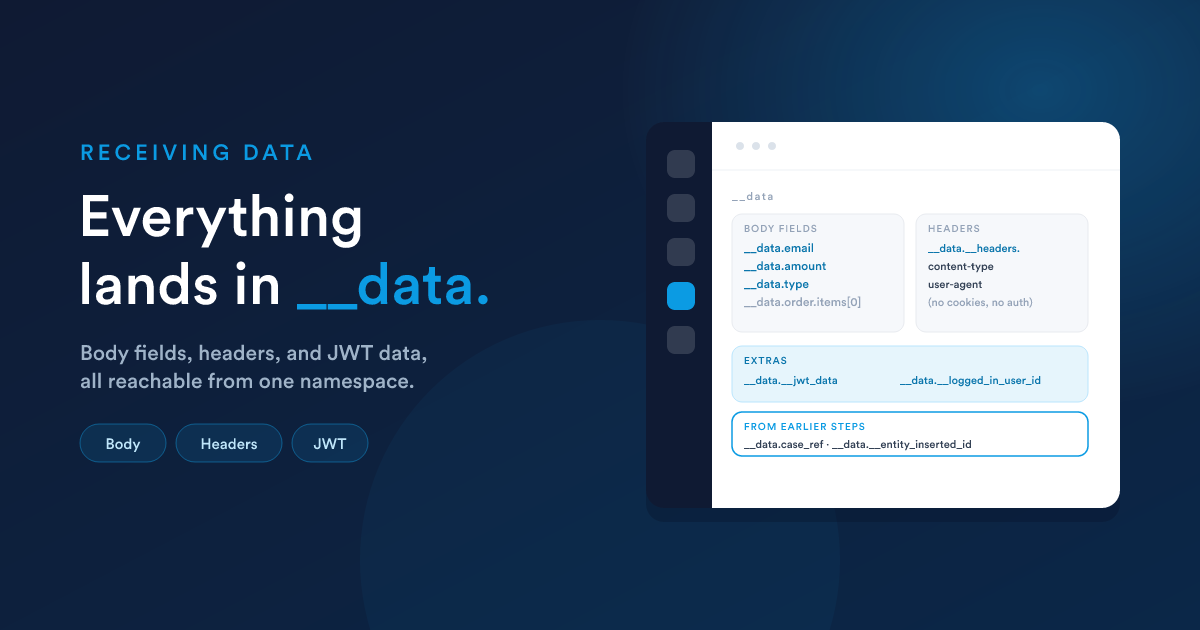
What Flexie accepts
When a request hits your endpoint, Flexie reads the data from wherever it is and merges it into one set of values. It walks the request in this order, taking the first that applies:
- Form-encoded data:
application/x-www-form-urlencoded(HTML form posts) ormultipart/form-data(form posts with file uploads). Form fields are merged with the query string. - A JSON body: when the request carries JSON. Decoded and merged with the query string. Nested objects and arrays are preserved (so
order.items[0].skuis reachable with the right token). - A raw body: anything else (plain text, XML, CSV, etc.). The whole body is wrapped under a single field so you can read it as text.
- The query string only: if no body is present, just the URL parameters.
So whether the caller posts JSON, a form, or just query parameters, the fields end up in the same place. You do not configure this. It just works.
Methods accepted
The endpoint accepts the methods you would expect a webhook receiver to be called with: GET, POST, PUT, and OPTIONS (the last one is the CORS preflight, handled automatically). The body-extraction order above applies whichever method is used.
Where each piece lands
Everything an incoming request brings, body fields, headers, and any extras, lives under the __data namespace:
| What arrived | How you read it in a step |
|---|---|
| A field in the request body | {{ __data.field_name }} |
| A request header | {{ __data.__headers.header_name }} |
| A value an earlier step stored | {{ __data.your_stored_name }} |
| The signed-in user's id (if the caller had a Flexie session) | {{ __data.__logged_in_user_id }} |
| The signed-in user's name (same condition) | {{ __data.__logged_in_user_full_name }} |
Extra data carried inside the JWT (if authenticated, and the token had a data claim) |
{{ __data.__headers.__jwt_data[0] }} |
Body fields are not at the top level here. They are under
__data. So a request body containing{{ __data.email }}, not{{ email }}. Headers and step-produced values are also under__data.
Example
A caller posts this JSON:
{
  "invoice_amount": 2500,
  "customer_email": "john@example.com",
  "customer_name": "John Doe"
}
Inside the workflow you read:
{{ __data.invoice_amount }}     → 2500
{{ __data.customer_email }}     → john@example.com
{{ __data.customer_name }}      → John Doe
{{ __data.__headers.content-type }}  → application/json
Headers, and what is removed
All request headers are available under {{ __data.__headers.* }}, except a few that are stripped for security and never exposed: cookies and any authentication credentials carried in the request.
If your authentication depends on something normally carried in a cookie, send it as a custom header or as part of the body instead.
Working with the data
Use the full Flexie Scripting toolkit on what arrived. Common needs:
Guard against missing fields, a caller might omit something:
{{ __data.customer_email | default("") }}
{% if __data.invoice_amount is defined and __data.invoice_amount %}…{% endif %}
Decode a JSON value that arrived as text (for example a nested structure passed as a string):
{% set order = __data.body_field | json_decode %}
First item: {{ jsonPath(order, "$.items[0].name") }}
Look up a matching stored record from an incoming value, then act on it:
{% set existing = findOne("contact", "email", __data.customer_email) %}
{% if existing %}
  Found contact {{ existing.id }}
{% endif %}
Authenticated calls and the JWT data claim
When the endpoint has authentication turned on, the caller's token is verified before any step runs:
- The token must be in the
Authorization: Bearer <token>header (a plaintokenheader is also accepted). - It must be signed with HS256, HS384, or HS512 and the listener's
endpoint_secret. - Its
iss(issuer) claim must equal the listener'sendpoint_key. - A 60-second allowance is given for minor clock differences between the caller and Flexie.
A token that is missing, invalid, expired, or whose issuer does not match is rejected before any workflow step runs. Your workflow does not even see those requests. The full protocol, the failure status codes, and code samples for building tokens in every common language are in Authentication & CORS in depth.
If the caller adds a data claim inside the token, its contents are exposed to the workflow under the headers namespace. Because header values are stored as a list (one entry per occurrence), reach into it with [0]:
{# Token's payload was { "iss":"internal-tools", "data": { "tenant":"acme" } } #}
{{ __data.__headers.__jwt_data[0].tenant }}   →  acme
This is useful for carrying request metadata that is not part of the body, a tenant id, a feature flag, an actor identity, without baking it into every request body.
What lands in __data, summarised
| Path | When it is set |
|---|---|
{{ __data.<field_name> }} |
Every request, body fields and query parameters |
{{ __data.__headers.* }} |
Every request, all headers except cookies and credentials |
{{ __data.__logged_in_user_id }} / {{ __data.__logged_in_user_full_name }} |
The caller arrived with a valid Flexie session |
{{ __data.__headers.__jwt_data[0] }} |
The endpoint requires JWT auth and the caller's token included a data claim |
{{ __data.<your_name> }} |
An earlier step in the workflow stored a value under <your_name> |
{{ __data.__entity_inserted_id }} / {{ __data.__entity_type }} |
An earlier step created a record |
How the data flows onward
Anything your steps store (with the Store a value action) or produce (a created record's id, a webhook reply) joins the same __data notepad and is available to later steps, exactly as in any workflow. See Passing data between steps.
So a typical endpoint workflow:
- reads the incoming body fields (
{{ __data.… }}), - looks up or creates real records from them,
- stores any ids or values it needs (
__data.…), - branches on them with a virtual condition,
- and optionally replies to the caller.
Next steps
- Virtual conditions: branching on what arrived.
- Responding to the caller: sending a reply back.
- Authentication & CORS in depth: the full JWT protocol and CORS rules.