Triggers & Sources
Last updated 23 May 2026
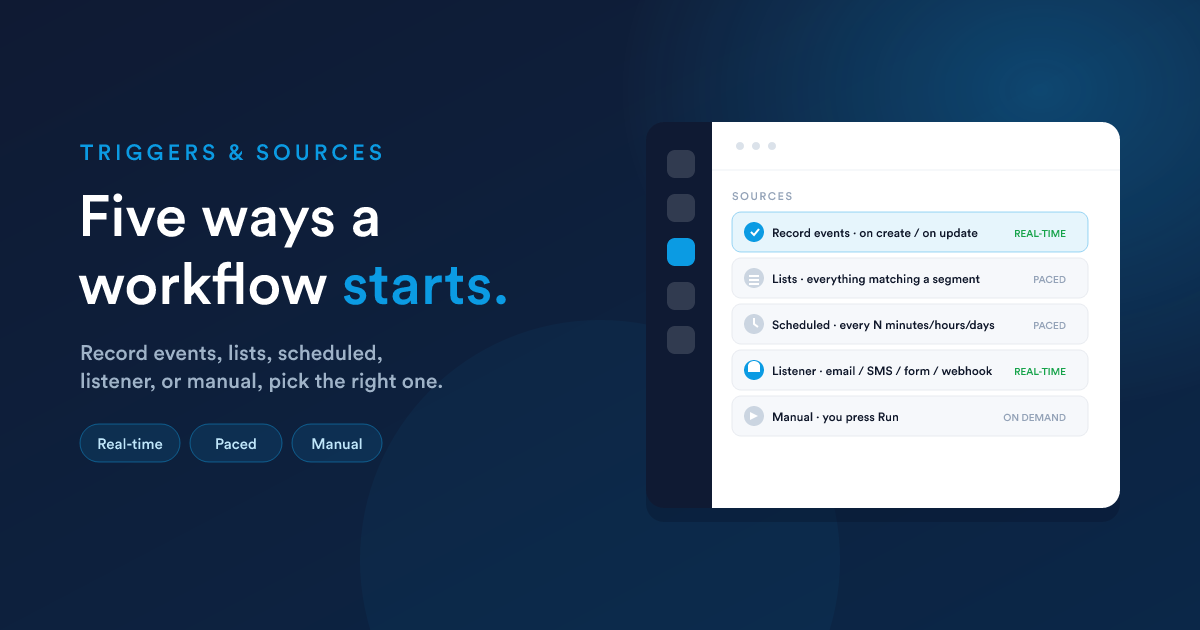
A workflow's source decides when it runs and which records flow into it. You set it when building the workflow.
The five sources at a glance
| Source | Starts when… | Typical use | Throttled? |
|---|---|---|---|
| Record events | a record is created or updated | "When a deal is won," "When a lead is created" | No, fires on the event |
| Lists | a record matches a saved list | recurring processing of everything matching a segment | Yes, by the hourly limit |
| Scheduled | a set cycle elapses | "every Monday," "every 6 hours" | Yes, by the hourly limit |
| Listener | an external signal arrives | an email, SMS, or WhatsApp comes in, a form is submitted, a page is visited, a web request hits an endpoint | No, fires on the signal |
| Manual | you press Run | one-off or on-demand processing | No |
1. Record events
The workflow fires the moment a record of its type is created or updated.
- On create runs for every new record of that type.
- On update lets you specify which field changes matter. The workflow then fires only when one of those fields changes (for example, only when a deal's stage changes, not on every edit). Configuring the watched field changes is required for update triggers, without it the trigger has nothing to react to.
Configuring "on update": watched field changes
For each watched field you can specify:
- The field: any standard or custom field on the record type.
- The "from" value (optional): only fire if the field was previously this value. Leave blank to fire for any previous value.
- The "to" value (optional): only fire if the field is now this value. Leave blank to fire for any new value.
You can list as many field changes as you need; the trigger fires when any of them match. This is how you build precise triggers:
- Watch: deal field
stage→ from*toWon→ fires only when a deal becomes Won, regardless of which stage it came from. - Watch: invoice field
status→ frompendingtopaid→ fires only on the pending-to-paid transition.
Both create and update
You can configure a workflow to fire on create and on update at the same time, handy when the same response is needed whether a record just arrived or just reached the relevant state.
Speed and throttling
Record-event workflows react in real time and are not subject to the hourly throttle. The change is detected and the workflow's first step is dispatched immediately.
Example: record type Deal, source Record events, on update when stage changes to Won, then onboarding steps run.
2. Lists
The workflow processes every record that matches a saved list (a smart list or segment). It is the right choice when you want to act on a population of records on an ongoing basis, rather than reacting to a single change.
Saved lists are managed per record type. Build the list first, then point the workflow at it.
Because a list can be large, list-sourced workflows are paced by the hourly limit so they do not flood the system, see throttling.
3. Scheduled
The workflow runs on a repeating cycle you define: every N minutes, hours, or days. Use it for time-driven work that is not tied to a single record change: weekly digests, nightly housekeeping, renewal sweeps.
Configuring the frequency
The frequency is a number and a unit, for example 6 × hour means "every 6 hours." The supported units are minutes, hours, and days. From those two controls you can build everything from "every 5 minutes" to "every 7 days."
What the workflow runs on
A scheduled workflow still has a record type. When it fires, it processes records of that type, often a saved list attached to it. For workflows that do not operate on a stored record (a daily digest, a periodic sync, a cleanup), choose the virtual record type, see Virtual entities.
Speed and throttling
Scheduled workflows are paced by the hourly limit so a high-frequency schedule on a large population does not overwhelm the system, and they respect any restricted hours and skip days you set.
4. Listener
The workflow waits for an external signal and fires when it arrives. The signal is the first step (the listener) and its children run when the signal comes in. Available signals include:
- An email arrives in a connected mailbox
- An SMS or WhatsApp message is received
- A message is delivered
- A form is submitted (see Forms)
- A page is visited or a tracked link is hit
- A task or note is created, or a comment or mention is added
- A web request hits a dynamic endpoint, see Dynamic Endpoints
Some listeners can only sit inside a workflow (for example "email opened" or "link clicked" only make sense after an email has been sent by an earlier step). Others act as the starting point of the whole workflow. The builder only offers each listener where it is valid.
Listener-sourced workflows fire on the signal and are not throttled.
When a listener fires, the data the signal carried (the email's subject and body, the SMS text, the form fields, the request payload) is made available to the following steps as
{{ __data.… }}. See Passing data between steps.
5. Manual
The workflow runs only when you press Run, from the workflow itself, or by pushing records into it from a list view. Use it for one-off jobs, for testing a process on demand, or for steps a person should consciously kick off.
A workflow can be configured to allow or disallow manual running.
Choosing the right source
Ask: what is the real trigger?
- "Something changed on one record" → Record events.
- "Everything that currently matches a condition" → Lists.
- "On a clock or calendar" → Scheduled.
- "Something arrived from outside" (message, form, web request) → Listener.
- "Only when a person decides" → Manual.
Mixing concerns is the usual mistake, for example using a scheduled sweep to catch a change that record-events would catch instantly. Prefer the source that matches the real trigger; it is faster and lighter.
A note on record types and "virtual" workflows
Most workflows run on a real record type (Lead, Deal, Invoice, a custom record). There is also a special virtual record type used when a workflow is driven by an incoming web request rather than a stored record. That is the Dynamic Endpoints topic. Virtual workflows can only use the Listener or Scheduled sources.
Next steps
- Actions & decisions: what the workflow does once it starts.
- Passing data between steps: using what the trigger provided.