Forms in Workflows
Last updated 25 May 2026
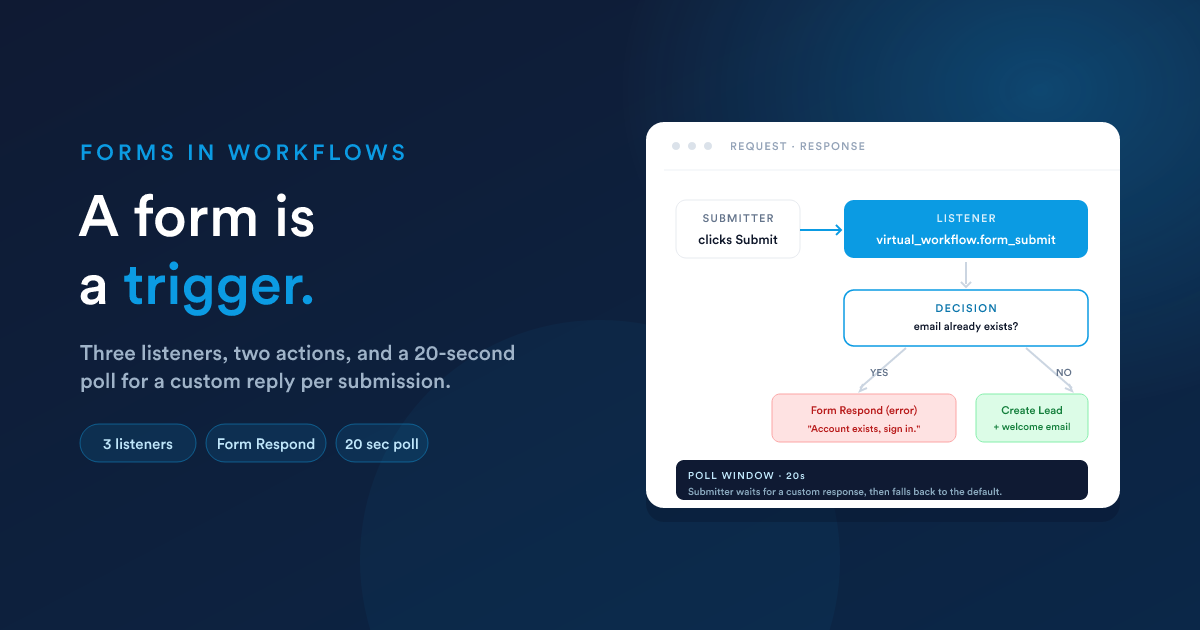
If you've used Workflows and Flexie Scripting, everything on this page will feel familiar. It is the same __data notepad and the same kind of listener / action wiring, just specific to forms.
The three form-submit listeners
Every form-submit event lands as a workflow listener you can use as the source of a workflow (the very first step). Which listener applies depends on the form's flavour:
External (public)
Listener key
virtual_workflow.form_submit
Workflow record type
__virtual
Fields land at
__data.form_submission.<key>
Internal, entity-bound
Listener key
form.internal_submit
Workflow record type
The record type the form is bound to (Lead, Contact, Deal, …)
Fields land at
__data.internal_form_submission.data.<key>
Internal, virtual
Listener key
virtual_workflow.internal_virtual_entity_submit
Workflow record type
__virtual
Fields land at
__data.internal_form_submission.data.<key>
When you build a workflow whose source is "Listener" and pick one of these listeners, the builder hides the listeners that don't apply to the workflow's record type, so you can't accidentally pair the wrong listener with the wrong record type.
1. The external (public) form listener
Listener key: virtual_workflow.form_submit Workflow record type: __virtual
What you get in __data
{
  "form_submission": {
    "<form field key>": "<submitted value>",
    "<form field key>": "<submitted value>",
    "attachments": [
      { "...file metadata..." }
    ]
  }
}
Fields are directly under form_submission, with no nested data wrapper and no metadata about the submitter, public submissions are anonymous.
Reading values
{# Form had fields "First Name", "Email", "Notes" #}
Hi {{ __data.form_submission['First Name'] }},

We received your message:
{{ __data.form_submission.Notes }}

We'll reply to {{ __data.form_submission.Email }}.
(Bracket notation for keys with spaces, see Submissions: bracket notation.)
Useful patterns
Create a lead from a public form submission:
- Trigger: this listener.
- Decision: check
{{ __data.form_submission['Email'] }}is not empty. - Action: Create a Lead with field values pulled from
__data.form_submission.<key>. - Action: write a custom response back to the submitter, see Writing a custom response.
2. The internal entity-bound form listener
Listener key: form.internal_submit Workflow record type: The record type the form is bound to (Lead, Contact, …).
What you get in __data
{
  "internal_form_submission": {
    "date_added": "2026-05-25 12:34:56",
    "__submitted_from_user_id": 7,
    "__submitted_from_user_full_name": "John Doe",
    "data": {
      "<form field key>": "<submitted value>",
      "<form field key>": "<submitted value>"
    }
  }
}
Notice the two differences versus the external form:
- The root key is
internal_form_submission. - Fields are nested under a
datasub-key, alongside submitter metadata.
Plus, because the workflow runs on the record the form was opened against, that record's fields are also available at the top level:
Contact's first name (from the record):    {{ first_name }}
Form's first-name field (from submission): {{ __data.internal_form_submission.data['First Name'] }}
Useful patterns
Update the record from the form:
- Trigger: this listener.
- Action: Update the contact, setting fields from
__data.internal_form_submission.data.<key>.
Audit who did it:
{# In a workflow step's "Add a note" action #}
Form "Qualification" submitted by
{{ __data.internal_form_submission.__submitted_from_user_full_name }}
on {{ date(__data.internal_form_submission.date_added, "M j, Y H:i") }}.
3. The internal virtual form listener
Listener key: virtual_workflow.internal_virtual_entity_submit Workflow record type: __virtual
What you get in __data
{
  "internal_form_submission": {
    "__submitted_from_user_id": 7,
    "__submitted_from_user_full_name": "John Doe",
    "data": {
      "<form field key>": "<submitted value>"
    }
  }
}
Same root and same nesting as entity-bound, but no date_added and no current record fields (the workflow runs on the virtual type).
Useful patterns
Spawn a new record from a virtual form:
- Trigger: this listener.
- Action: Create a Lead / Contact / Case with the fields from
__data.internal_form_submission.data.<key>. - Optional: Store the new record's id (
__data.__entity_inserted_id) and continue with steps that need it.
Stamp a timestamp yourself:
Because this listener doesn't include date_added, use now() in your first step to capture the moment:
{% set submittedAt = now() %}
…and then write that into any record you create.
Side-by-side: which root, nesting, metadata?
External (public)
Listener key
virtual_workflow.form_submit
Workflow record type
__virtual
__data root
form_submission
Fields nested under
(the root, no data wrapper)
date_added
-
Submitter user id / name
-
Top-level record fields
-
Internal, entity-bound
Listener key
form.internal_submit
Workflow record type
The bound type (Lead, Contact, …)
__data root
internal_form_submission
Fields nested under
data
date_added
✓
Submitter user id / name
✓
Top-level record fields
✓ (the bound record)
Internal, virtual
Listener key
virtual_workflow.internal_virtual_entity_submit
Workflow record type
__virtual
__data root
internal_form_submission
Fields nested under
data
date_added
-
Submitter user id / name
✓
Top-level record fields
-
Bookmark this; it is the cheat-sheet that prevents the most common form-workflow mistake (wrong path to the value).
Pushing a form to a user mid-workflow
The "Trigger Internal Form" action
A workflow can send a form to a signed-in user during its execution, then continue once the user submits.
The action's settings:
| Setting | What it sets |
|---|---|
| Which form | The internal form to push. (Must be an internal form.) |
| Which user | The current owner, a specific user, the user who triggered the workflow, or any rule-based selection. |
| (Entity-bound forms) Which record | The record the submission should attach to, usually the current record the workflow is running on. |
The action is immediate, it doesn't queue the step. The form appears for the chosen user in their interface immediately, and the workflow's next step runs once that user submits the form. If you need to time out a long wait (e.g. "if no one fills it in within 24 hours, escalate"), pair this with a restricted-hours-style branch.
There are two action variants:
form.triggerinternal, for workflows on a real record type (the form is attached to that record).form.triggerinternal.virtual, for workflows on the virtual record type.
The builder shows you the right one for the workflow you're in.
Writing a custom response per-submission
This is the pattern that turns a form into a small request/response API: the submitter waits a moment after clicking Submit while the workflow decides what to say, then sees a reply tailored to what they entered.
How it works
- The submitter clicks Submit.
- Flexie stores the submission and starts the workflow.
- The frontend polls for up to 20 seconds waiting for the workflow to write a response.
- The workflow has a Form Respond action somewhere in its tree that produces the response.
- When that action runs, the response is delivered to the polling submitter and they see it.
- If 20 seconds pass with no Form Respond action firing, the form falls back to its default post-submit behaviour (the message or redirect set in the form's Settings).
The "Form Respond" action
The action has two variants:
form.form_respond, for entity-bound internal-form workflows.virtual_workflow.form_respond, for external-form and virtual-form workflows.
The settings:
| Setting | What it does |
|---|---|
| Response type | One of message, redirect, error, json (see below). |
| Response value | The body of the response, computed with Flexie Scripting. |
Response shape
There are exactly four response types. Pick the one that matches what the submitter's browser should do:
| Response type | What the submitter sees | Useful for |
|---|---|---|
| message | A confirmation message shown on the form | "Thanks, we'll be in touch with you at {{ __data.form_submission.Email }}." |
| redirect | The browser navigates to a URL | Sending them to a thank-you page that depends on what they submitted |
| error | A red error message shown on the form (the form stays open with their input still in place) | Rejecting a submission with a reason ("This email is already on file, please log in instead.") |
| json | A raw JSON body | When your front-end is calling the form's submit URL via JavaScript and wants the response programmatically rather than as a rendered message |
Example, branched custom message
Trigger:  Listener, virtual_workflow.form_submit
Step 1:   Decision, does {{ __data.form_submission['Email'] }}
          match an existing contact?

  Yes ─►  Form Respond (error):
          "An account already exists for that email,
           please reset your password."

  No  ─►  Step 2: Create a Contact
          Step 3: Form Respond (redirect):
          "https://www.yoursite.com/welcome
            ?id={{ __data.__entity_inserted_id }}"
Timing notes
- The polling window is 20 seconds. A Form Respond action that fires later than that doesn't reach the submitter; only the default response does.
- If your workflow takes a long time before reaching the Form Respond step (e.g. it makes a slow webhook call first), consider letting the form return its default response and doing the long work asynchronously, then notifying the submitter another way (email, SMS).
- The form's default response (set in form Settings) is always the fallback. It's worth making it sensible on its own ("Thanks, we'll be in touch soon") rather than relying on Form Respond always firing in time.
Pairing forms with other workflow building blocks
Forms slot into the same workflow patterns as any other listener trigger:
- Virtual conditions: branch on the values in
__data.form_submission.*or__data.internal_form_submission.data.*. - Lookups: use
findOne/findManyto check whether a submitted value already exists in your data. - The webhook action: forward the submission to another system.
- The AI step: have AI classify the submission ("does this look like a sales lead or a support question?") and branch.
Quick reference card
EXTERNAL public form
  listener:           virtual_workflow.form_submit
  record type:        __virtual
  read fields as:     {{ __data.form_submission['<key>'] }}
  no submitter info, no date

INTERNAL entity-bound form
  listener:           form.internal_submit
  record type:        the bound type (Lead, Contact, …)
  read fields as:     {{ __data.internal_form_submission.data['<key>'] }}
  read submitter as:  {{ __data.internal_form_submission.__submitted_from_user_full_name }}
  read timestamp as:  {{ __data.internal_form_submission.date_added }}
  top-level fields:   the record's own fields (e.g. {{ first_name }})

INTERNAL virtual form
  listener:           virtual_workflow.internal_virtual_entity_submit
  record type:        __virtual
  read fields as:     {{ __data.internal_form_submission.data['<key>'] }}
  read submitter as:  {{ __data.internal_form_submission.__submitted_from_user_full_name }}
  (no date_added, use now() if you need one)

WORKFLOW ACTIONS
  form.triggerinternal            push an internal entity-bound form to a user
  form.triggerinternal.virtual    push an internal virtual form to a user
  form.form_respond               write custom response (entity-bound)
  virtual_workflow.form_respond   write custom response (external / virtual)

RESPONSE TYPES (for *form_respond actions)
  message, confirmation message on the form
  redirect, send the browser to a URL
  error, red error message, form stays open
  json, raw JSON body for JS callers

RESPONSE WINDOW
  20 seconds from submit; after that, the form's default response is used.
Back to
- Forms overview: the section map.
- Submissions: viewing what's been collected.
- Workflows: the wider automation engine.