Passing Data Between Steps
Last updated 23 May 2026
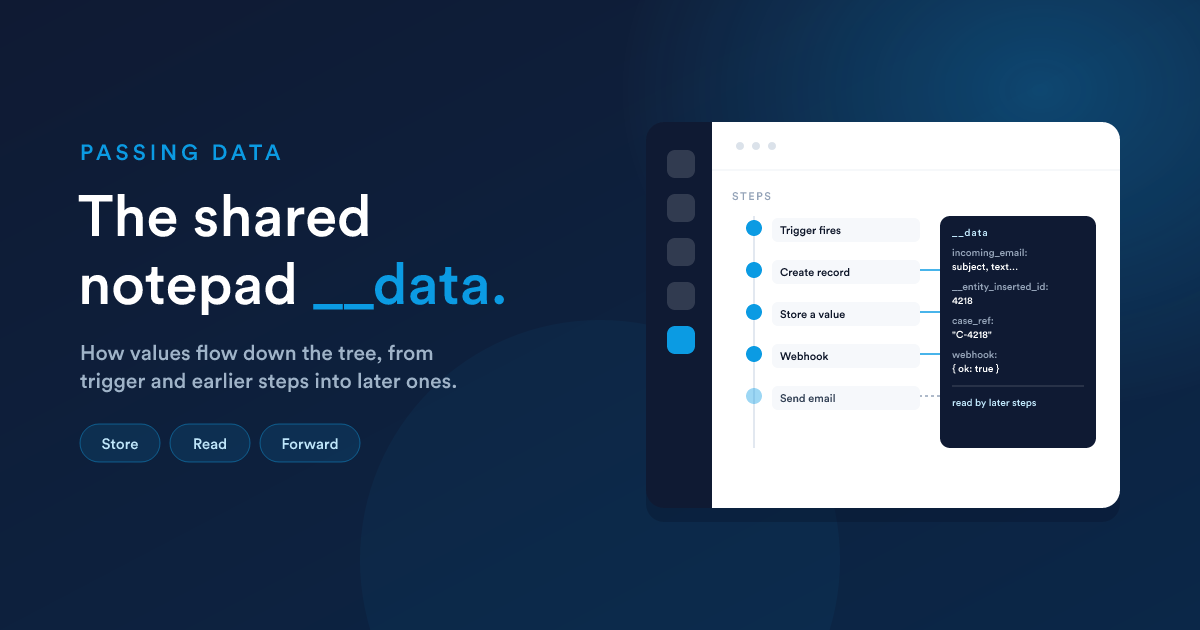
As a workflow runs, it gathers information: the data the trigger carried, values earlier steps computed, the ids of records it created, replies from webhooks. All of it is collected in one place, a shared namespace called __data, and any later step can read it with Flexie Scripting:
{{ __data.incoming_email.subject }}
{{ __data.__entity_inserted_id }}
{{ __data.my_stored_value }}
Think of __data as a notepad that every step in the run can read, and that specific steps write to. It is scoped to this workflow, for this record. There is no leakage between records or between workflows, and within a run there is no expiry: anything written stays available to everything downstream.
One rule that ties back to the tree: a step can only rely on data that was produced above it in the tree. If step B needs what step A produced, B must be a descendant of A, not a sibling running alongside it.
What writes into __data
1. The trigger or listener signal
When a workflow starts from a listener, the signal's data is placed into __data before the first step runs. So the very first action can already use it. The common signals and what they provide:
| Trigger signal | Read it as | Useful fields |
|---|---|---|
| An email arrives | __data.incoming_email | from_email, from_name, subject, text, html, cc_emails, date_received, attachments |
| An SMS or WhatsApp is received | __data.incoming_sms | sender_number, to_number, text, date_received |
| A message is delivered | __data.delivered_sms | text, date_delivered |
| A task is created | __data.last_task | task, due_date, category, owner, created_by |
| A task is updated | __data.updated_task | (same shape as a new task) |
| A note is added | __data.last_note | note, note_text, category, author |
| A mention in a note | __data.mention | note, note_text, author, mentioned_user |
| A comment is added | __data.last_comment | note, comment, comment_text, author |
| A page is visited or link hit | __data.page_visit | url, utm_*, external_referer, date_hit, ip |
| A web request hits a dynamic endpoint | __data.<body_field> for each body field, plus __data.__headers.* for headers | see Dynamic Endpoints, Receiving data |
2. The "Store a value" action
The most direct way to put something on the notepad yourself. You give it a name and a value (computed with Flexie Scripting), and from then on it is available as {{ __data.<name> }}. Use it to compute something once and reuse it across many later steps.
3. Steps that create records
When a step creates a record, the new record's id is placed in __data.__entity_inserted_id (and its type in __data.__entity_type). This is how a later step references the exact record an earlier step just created, for example, record a payment against the invoice this run just generated.
4. The Webhook action
A Webhook action stores the other system's reply under the name you choose (default webhook), so a later step can branch on the response or use values from it: {{ __data.webhook }}, and the status code as a convenient companion value.
5. The AI step
An AI step stores the model's output (default name __ai_response) so later steps can use what the AI produced, for example, send the AI-drafted reply, or branch on the AI's verdict.
Reading values
Reach into the data with dots, exactly like record fields:
Hi {{ __data.incoming_email.from_name | default("there") }},

We received your message:
"{{ __data.incoming_email.subject }}"
Combine it with the Flexie Scripting toolkit to reshape or guard it:
{# A received payload may be JSON text, decode then read it #}
{% set order = __data.webhook | json_decode %}
Order {{ order.id }} total: {{ jsonPath(order, "$.totals.grand") | number_format(2) }}
Always guard values that might be absent with default(...) or an {% if %}. A signal field can be empty, and a webhook might not return what you expect.
A worked example
Trigger (listener): an email arrives in the support mailbox. Decision (virtual condition): does
{{ __data.incoming_email.subject }}contain "invoice"? Yes: Create a case, subject ={{ __data.incoming_email.subject }}, description ={{ __data.incoming_email.text }}. Then Store a valuecase_ref= the new case id ({{ __data.__entity_inserted_id }}). Then Send an email acknowledging case{{ __data.case_ref }}.
Each step uses what the ones above it produced, that is __data doing its job.
Sharing across workflows (briefly)
__data is private to one run. If you genuinely need a value to outlive a run and be read elsewhere, the Set shared memory action writes to a short-lived shared store that other workflows (and templates) can read with memoryGet("key"). Use it sparingly, it is for cross-workflow signals, not general data passing.
Next steps
- Runtime, parallel execution & the tree: why data only flows downward.
- Dynamic Endpoints, Receiving data: how an incoming web request lands in
__data.