Live Monitor
Last updated 26 May 2026
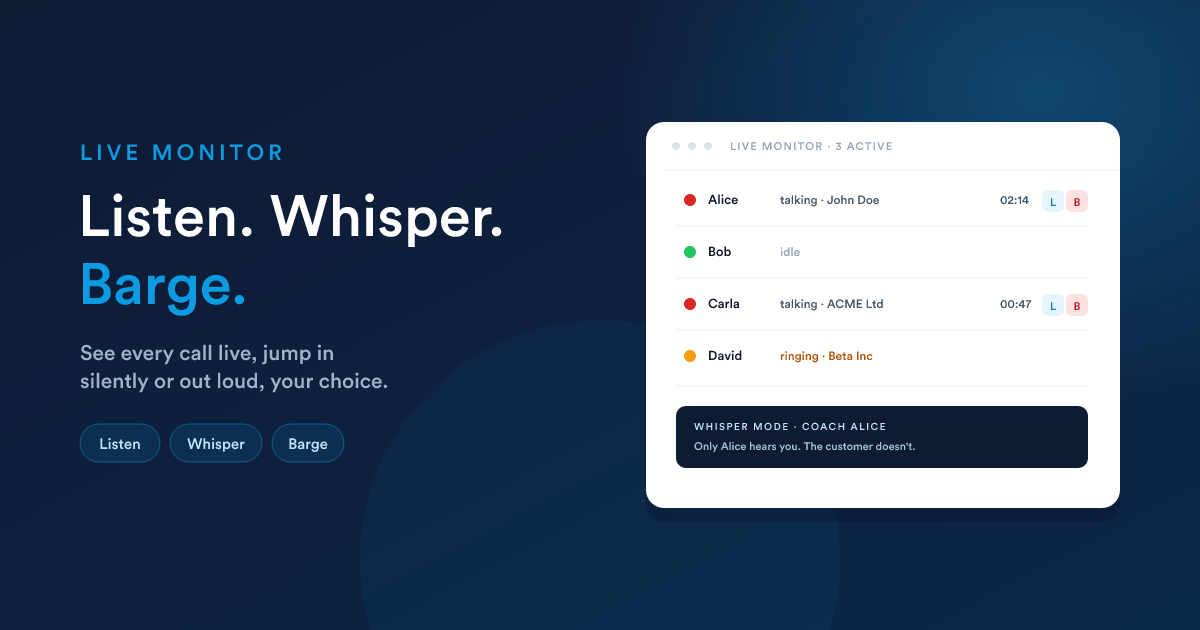
A supervisor-only screen that shows every call happening right now, who's on it, and lets you listen in, whisper to your agent (only they hear you), or barge in (everyone hears you). The classic call-centre supervision triad.
Live monitor is part of the self-hosted PBX channel. It relies on your PBX's listen / whisper / barge primitives. The Twilio equivalent (real-time event stream, call-recording playback) is handled inside Twilio's own console.
What the page shows
The list updates in real time. New calls appear immediately, completed calls drop off, ringing-to-talking states change without a refresh.
Per agent you see:
| Column | Meaning |
|---|---|
| Agent | The user's name and extension. |
| Status | Idle (logged in, no call), Ringing, Talking, or Paused (manually away). |
| Customer | The matched record, or just the number if no match. Clicks through to the customer's record. |
| Direction | Incoming or outgoing. |
| Time | Elapsed talk time on the current call. |
| Controls | The three supervision actions (only on active calls). |
The three supervision actions
Listen (silent monitor)
You join the call as a silent observer. Neither the customer nor the agent hears you. They keep talking; you hear both sides.
Use this for quality assurance, agent training reviews, or "what's happening on the floor right now" awareness.
Whisper (coach mode)
The agent hears you, the customer doesn't. The agent can respond verbally in a way that sounds natural to the customer.
Use this for coaching during a call ("ask them about the renewal date", "I'll take this one in a minute") without breaking the customer experience.
Barge (full join)
You join the call fully: both the customer and the agent hear you and you can talk to both. The call becomes a three-way.
Use this when you need to take over directly: escalation, the agent needs help they can't be coached through, or you need to apologise to a customer in person.
All three modes are toggled by leaving the supervised call (clicking the End button on your own softphone disconnects you without affecting the agent or customer).
Setting up live monitor
Admin-only. The page asks for the credentials your PBX uses to expose its management interface to Flexie, plus the three feature codes that drive listen, whisper, and barge.
| Field | What it is |
|---|---|
| PBX management URL | The address Flexie uses to talk to your PBX's management interface (your PBX integrator will have given you this). |
| PBX management user | The username for that interface. |
| PBX management password | The matching password. |
| Listen code | The feature code in your PBX's dial plan for listen-only mode. |
| Whisper code | The feature code for whisper mode. |
| Barge code | The feature code for barge mode. |
The three codes come from your PBX team. They're the dial-plan shortcuts that one extension uses to spy on another. If they set this up for you, they'll have the three values; paste them in.
Save and the supervision buttons activate on every live call.
If only the management URL, user, and password are configured but the feature codes aren't, the page still shows live call state (you can see who's talking) but the listen / whisper / barge buttons are hidden.
Permissions
Live monitor is supervisor-only. Granting the see-everyone scope on call logs to a role also gives that role access to the live monitor; the configure-everything scope adds the right to manage the settings page and use the supervision buttons.
A user without the see-everyone scope only sees their own calls, meaningless on a supervision page, so the menu item is hidden.
What it doesn't do
- No extra recording on the supervisor side. Listening, whispering, or barging doesn't add a separate recording. The same call-level recording setting applies (the supervisor's audio is mixed in for barge, just like any other party).
- No call queueing or routing. Live monitor is a view-and-act page; it doesn't decide where calls go. That's still the PBX's job.
- No agent-side controls beyond supervision. You can't force-mute an agent's mic, force-hold a call, or transfer it from this screen. Agents handle their own calls.
Gotchas
- PBX management interface must be reachable. From Flexie's server, you must be able to reach your PBX's management URL. If they're on different networks, open the route.
- The supervisor's softphone gets a real call. The supervision is delivered as a call to the supervisor's own extension, so the supervisor needs an extension too (see Channels).
- Encryption. If Flexie is on a secure (HTTPS) URL but the PBX management URL is plain, browsers and the integration may refuse the connection. Run the PBX management over a secure URL too.
- Feature codes vary by PBX build. Different PBXes use different feature-code conventions. Test all three modes on your own extensions before relying on them in production.
Next
- Workflows: the completed-call trigger picks up monitored calls too.
- Call logs & timeline: where the completed calls land.