Overview
Last updated 26 May 2026
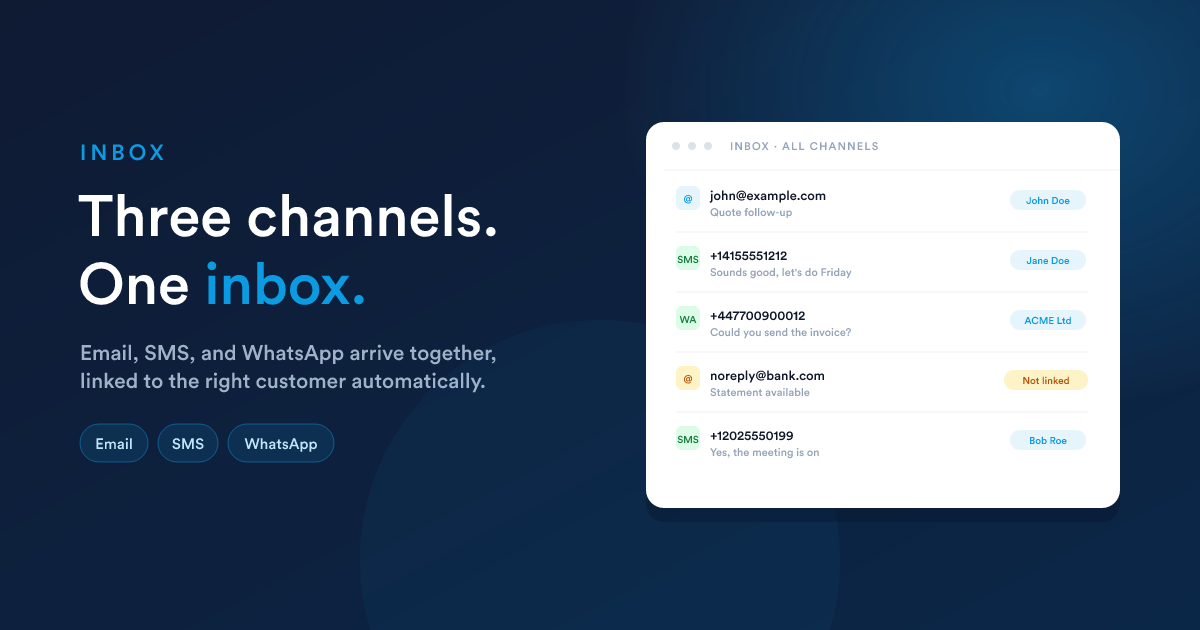
Email, SMS, and WhatsApp, all flowing into one view per user, with every message landing on the right customer's timeline automatically. Any incoming message can kick off a workflow.
Inside the inbox, a channel switcher lets you narrow the view to Email, SMS, or WhatsApp, or pick All to see every channel mixed into one timeline.
What the shared inbox is
A single timeline that interleaves emails, text messages, and WhatsApp conversations into one list. Each row is the most recent message in a thread; clicking a row opens the full conversation in the channel's view.
The same conversation also appears on the timeline of the customer it's linked to, so opening a contact, lead, deal, account, or case shows every email, SMS, and WhatsApp exchanged with them, regardless of which channel each came in on.
Channel accounts and who can use them
The inbox isn't a single global mailbox that the whole company shares. It's a per-user view that combines every channel account the user has been given access to. You add as many accounts as you need, and each account decides who can use it.
Email mailboxes
Each team member connects their own from their profile. A user's inbox shows the mailboxes they've connected, so personal correspondence stays personal.
SMS lines
Set up at platform settings. Each line has an Access list: all users, specific permission sets, user groups, or named users only. Anyone with access can send and receive on that line.
WhatsApp channels
Each paired number is a separate channel with the same kind of Access list. Pair as many numbers as you need (Sales, Support, a specific region) and grant the right team to each one.
So a sales SMS line might be shared with the whole sales team, a support WhatsApp number only with the support group, and a personal email mailbox only with the person who connected it. Each user's inbox is the union of whatever they've been granted, plus their own.
"Shared" in shared inbox means shared across channels for every user, and shared across the team for any account whose access list includes more than one person.
The icons mark the channel; the chip on the right shows the customer the message has been auto-linked to.
The three channels at a glance
Long-form back-and-forth: quotes, contracts, follow-ups, anything you already send by email. Replies stay together as one conversation, both in Flexie and in the recipient's email app.
SMS
Short, time-sensitive messages: reminders, confirmations, one-word replies. Fast, direct, and the customer doesn't need any app to receive them, just a phone with signal.
The channel many of your customers already chat on every day. Send text, photos, voice notes, and PDFs, or run a full group chat with a customer's whole team.
Pick a channel from the channel switcher at the top of the inbox. The All view is the default: three channels interleaved in one list.
Each channel has its own setup, conventions, and workflow triggers. The channel-specific pages cover the detail:
- Email: connecting a mailbox, sending, threading, attachments, the inbound and "opened" workflow triggers.
- SMS: adding an SMS line, sending, inbound, and the "received" / "delivered" workflow triggers.
- WhatsApp: adding a WhatsApp number via QR pairing, sending text and media, the inbound workflow trigger (including group chat fields).
- Templates: email templates and SMS templates that also feed WhatsApp.
- Workflows & automation: the full list of channel triggers and actions, plus what data each one makes available to your workflow.
The filters above the list
Above the inbox list there's a filter pill:
| Filter | Meaning |
|---|---|
| All | Everything |
| Seen | Messages already opened (by you) |
| Unseen | New / unread |
| Linked | The message is auto-attached to a customer record |
| Not linked | Couldn't be matched to a customer, needs attention |
| Attachment | Has at least one file attachment |
The filter combines with the channel selector. Channel: SMS plus Filter: Unseen shows just the unread SMS conversations.
How messages are linked to customers
When an incoming message comes in, Flexie tries to attach it to one or more customer records automatically. The rule is per-channel:
| Channel | Match by |
|---|---|
| The sender's email address compared against any email field on contacts, leads, accounts, deals, cases, and users | |
| SMS | The sender's phone number (in international format) compared against any phone/mobile field on the same set of records |
| The sender's phone number (in international format) compared against the same phone/mobile fields |
A single message can link to more than one record. If the same email address belongs to a contact and a lead, both get linked, both get the message on their timeline. If nothing matches, the message still lands in the inbox but shows up under the Not linked filter so someone can attach it by hand.
When a message links to a record, it also becomes a possible trigger for automations on that record's type. See Workflows & automation.
How messages are grouped into conversations
Each channel uses its own grouping rule:
- Email: Flexie follows the reply chain. A reply to an existing message stays in the same thread; the recipient's email client sees it as a proper reply too.
- SMS: a conversation is the pair of phone numbers involved. The inbox row shows the latest message in that conversation; opening it shows the full history with that number.
- WhatsApp: for direct chats, a conversation is the pair of phone numbers (regardless of who messaged first). For group chats, a conversation is the group itself, and each message shows who sent it inside the group.
What's covered in this section
- Email: adding a mailbox, the compose flow, and the email triggers (Incoming emails and Email opened).
- SMS: connecting an SMS line, sending from the inbox or a customer's page, and the SMS triggers ("received" and "delivered").
- WhatsApp: adding a WhatsApp number (QR pairing, access control, optional proxy), sending text and media, and the inbound trigger including group chats.
- Templates: saved templates for email and SMS, how variables work, and how templates feed both SMS and WhatsApp compose.
- Workflows & automation: every channel trigger and action, with the data each one makes available to your workflow.
Closely related
- Telephony: phone calls are the fourth channel that lands on the same customer timeline, with click-to-call from any phone field, recordings, and the Completed call workflow trigger.
- Workflows: every incoming message is a potential workflow trigger; every outgoing message can be a workflow action.
- Cases & support: an inbox message becomes a support case in one click.
- Contacts & leads: the customer timeline is the same data this inbox shows, just sliced per-record.